
-14%
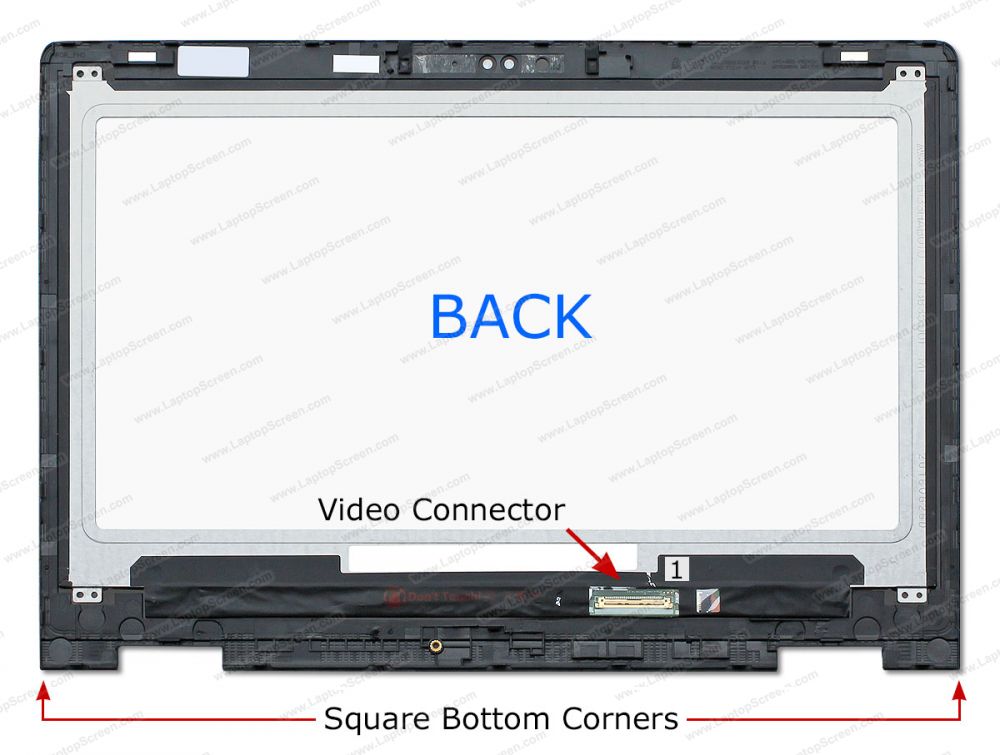
Dell Inspiron 13-5000 touch screen replacement, fits Dell Inspiron 13-5358, Dell Inspiron 13-5368, Dell Inspiron 13-5378, Dell Inspiron 13-5379, Dell Inspiron 13-5365
Original price was: KSh25,000.KSh21,500Current price is: KSh21,500.
Description
Description
Dell Inspiron 13-5000 touch screen
Dell Inspiron 13-5000 touch screen
Replacing the touchscreen on a Dell Inspiron 13-5000 series laptop involves several steps. This guide will help you through the process, ensuring that you handle everything carefully to avoid damage. Please ensure you have the right replacement part and tools before starting.
Tools and Materials Needed
- Screwdrivers: Phillips #0 or #1 screwdriver
- Plastic prying tools: To avoid damaging the casing
- Tweezers: For handling small components
- Suction cup (optional): Helpful for lifting screens
- Replacement touchscreen assembly
Step-by-Step Replacement Process
- Preparation:
- Turn off your laptop completely.
- Disconnect it from any power source by removing the AC adapter.
- Remove any connected devices (USB drives, external monitors, etc.).
- Remove Battery (if applicable):
- If your model has a removable battery, take it out for safety.
- Remove Front Bezel:
- Use plastic prying tools or a suction cup to gently pry off the front bezel of the touchscreen display.
- Start from one corner and work your way around; be gentle to avoid cracking or damaging it.
- Disconnecting Touchscreen/Display Assembly:
- Locate and unscrew any screws holding the display assembly in place once you’ve removed the bezel.
- Carefully disconnect all cables attached to the screen (including LCD and touch digitizer connectors). Use tweezers if necessary for small connectors.
- Removing Broken Display/Touchscreen Assembly:
- With all screws removed and cables disconnected, gently lift out the broken display/touchscreen assembly.
- Install New Touchscreen/ Assembly:
- Place your new touchscreen/display assembly into position with attention to aligning screw holes correctly.
- Reconnect all necessary cables securely but gently; make sure not to bend pins or force connections.
- Reattach Display Screws & Bezel:
- Securely fasten screws back into place for stability.
- Carefully reattach front bezel around your new screen by pressing down until you hear clicks indicating it’s secure.
- Reinsert Battery & Power Up Device
- If you removed a battery, reinsert it now 2. Plug in your AC adapter again and power up your device to check functionality.
- Testing Functionality:
- Once powered on, test both touch functionality as well as general display features to ensure everything is working properly.
Reviews (0)


Reviews
There are no reviews yet.